---
title: WebUI Tour
description: "Complete walkthrough of the AzurPilot WebUI: task configuration forms, visual scheduler, statistics, and system settings."
updated: 2026-10-20
---
# WebUI Tour
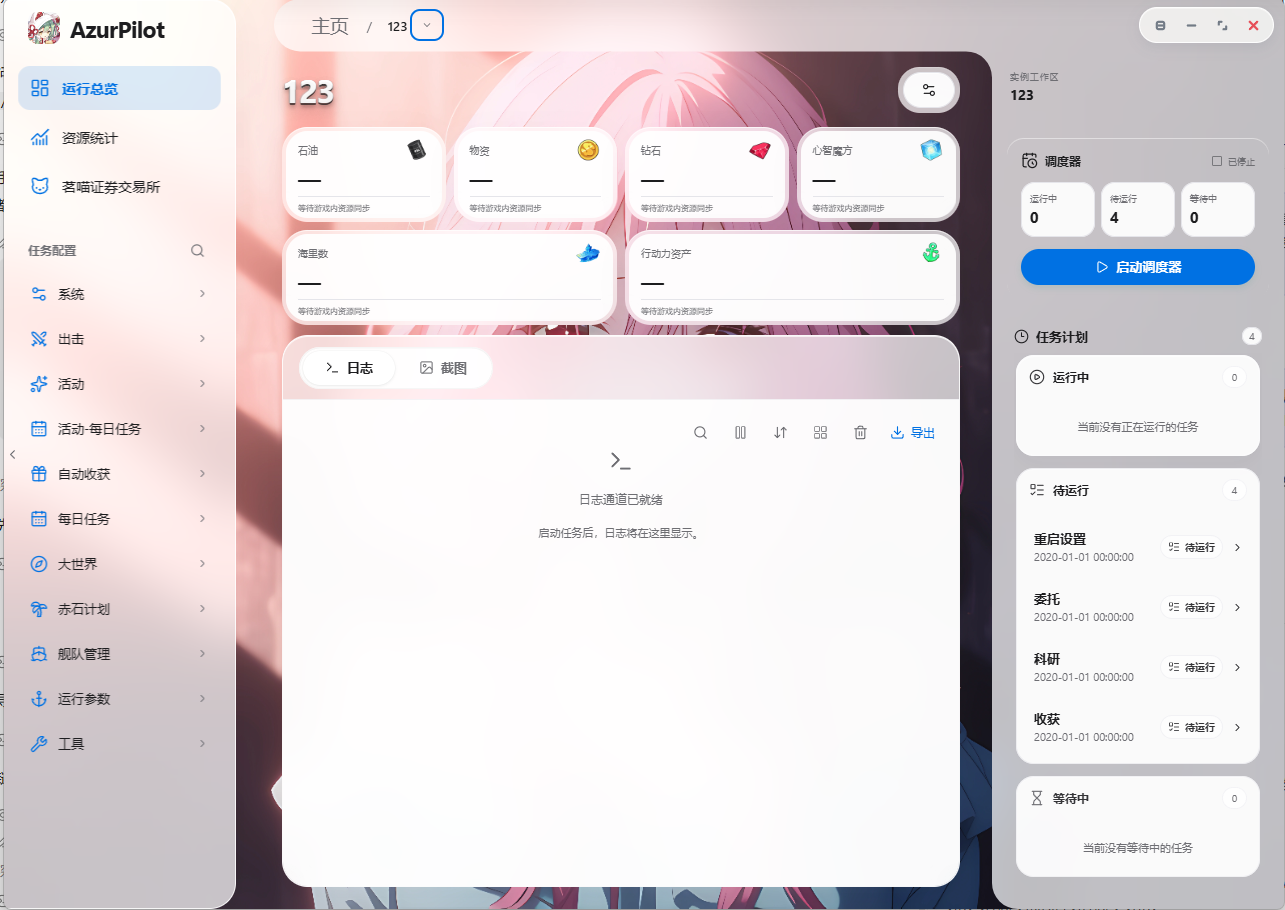
The WebUI is a desktop management console constructed with React and Vite that communicates with the Python backend over `/api/v1/ws`. It issues scheduler commands and commits configuration patches without calling game APIs directly.
## Page Catalog
| View | Route | Purpose |
| --- | --- | --- |
| Home | `/` | Instance cards, start/stop switches, global announcements |
| Overview | `/i//overview` | Active task, resource levels, live log tail, quick actions |
| Task Configuration | `/i//task/` | Forms dynamically generated from configuration schemas |
| Statistics | `/i//statistics` | Sorties, resources, Operation Siren, commissions, and warehouse analytics |
| Stock Exchange | `/i//stock-exchange` | Independent trade transaction ledger |
| Scheduler Program | `/i//task/SchedulerProgram` | Visual graph-based orchestration (Legacy / Enhanced / Takeover) |
| Mind Calculator | `/i//task/MindCalculator` | Shipyard scanning and Cognitive Array cost calculations |
| Fleet Technology | `/i//task/FleetTechnology` | Tech point scanning and ship progression |
| Installed Configs | `/configs` | Import, export, duplicate, and remove instances |
| Settings | `/settings` | Account vault, remote access, updates, theme settings |
| Updates | `/updater` | Inspect upstream commits and apply updates |
| Announcements | `/announcement` | Release notes and setup advisories |
## Overview View
The Overview view consolidates operational telemetry onto a single screen:
- **Active Task**: Displays current task name and state streamed via `set_task()`.
- **Resources**: Real-time gauges for oil, coins, gems, and action points extracted from screenshots.
- **Log Tail**: Worker output stream colored by log severity levels.
- **Quick Actions**: Start / stop / restart instances, force immediate task execution, capture test screenshot.
Log outputs clearly demarcate task transitions:
```text
[AzurPilot] Scheduler: Start task
──────────────── Research ────────────────
[AzurPilot] Scheduler: End task
```
## Task Configuration Forms
The left pane lists task groups (Campaign, Events, Operation Siren), while the right pane renders active forms generated dynamically from `argument.yaml` definitions.
### Form Sections
| Section | Description |
| --- | --- |
| Description | Help tooltips next to task names derived from localization files |
| Scheduling Settings | Enable toggle, push notifications, next run timestamp, success/failure intervals, sensitive mode |
| Task Parameters | Specific settings for the active feature, such as stage names, fleet assignments, stop rules |
| Storage Target | Specifies which database table stores execution results |
### Input Types
| Control | Schema Type | Operational Behavior |
| --- | --- | --- |
| Checkbox | `checkbox` | Boolean toggle; takes effect immediately upon save |
| Select Menu | `select` / `option` | String or numeric enumeration values |
| Input Box | `input` / `textarea` | Text values with regex validation |
| Timestamp | `datetime` / `time` | Clearing the field triggers immediate task execution |
::: tip Asynchronous Save Pipeline
Form adjustments are queued and committed via `config.patch` with `revision` checks to detect concurrent edits. Wait for the "Saved" notification before navigating away.
:::
### Sensitive Tasks
Toggling `Scheduler.Sensitive` instructs the engine to **terminate the instance worker** upon errors rather than restarting the game. This setting defaults to enabled on `OpsiCrossMonth`, `OpsiObscure`, and `OpsiAbyssal` to prevent state corruption from repeated reboot attempts.
## Visual Scheduler Program
Located under "Task Config → System → Custom Scheduling", this node-based canvas provides custom orchestration:
- Nodes feature input ports on the left and output ports on the right; square ports govern control flow, while round ports pass data.
- Supports marquee selection, multi-select, copy/paste, undo/redo, select-all, and wire deletion.
- Edit common variables (resources, tasks, comparison operators, wait delays) directly on cards, or open the right-side inspector for full properties.
- Validated server-side before application; running instances apply changes at safe task boundaries.
Three operational modes:
| Mode | Execution Behavior |
| --- | --- |
| Legacy Scheduling | Retains standard priorities and schedules while enabling automatic oil threshold management |
| Enhanced Scheduling | The engine selects only from enabled and due tasks, overriding parameters dynamically |
| Full Takeover | The graph governs all business tasks regardless of form toggles; recovery routes remain active |
::: warning Simulate Plans Before Application
The editor includes a simulation engine (`scheduler.program.simulate`) that runs test plans against simulated clocks and mock resources without connecting devices. Draft edits do not affect live workers until you click "Apply Plan".
:::
## Statistics & Analytics
The Statistics view graphs historical SQLite records: resource consumption curves, sortie counts, loot drops, Operation Siren yields, commissions, research projects, and warehouse inventories. The Resource Management tab provides Sankey diagrams tracking resource inflows and outflows.
## Mind Calculator & Fleet Technology
- **Mind Calculator**: Scans shipyards to identify ships and levels, allowing manual review before calculating Cognitive Array requirements with JSON / CSV / XLSX export.
- **Fleet Technology**: Scans ship progression to track tech points independently of cognitive limit-break rules.
Both features consume data generated by `MindCalculatorScan` and `FleetTechScan` tasks.
## System Settings
| Section | Scope |
| --- | --- |
| Account | Account vault: create, unlock, bind to TPM or local machine keys, switch profiles |
| Remote Access | Cloudflare Quick Tunnel toggle, pairing QR codes, authorized devices, revocation |
| Updates | Review local HEAD against upstream commits, pull changes, apply updates |
| Interface | Themes, languages, background image libraries, UI density |
| Configuration | Export, import, clone, and delete instances |
## Themes and Localization
- Interface translations support `zh-CN`, `zh-TW`, `ja-JP`, and `en-US`. Parameter descriptions load from `module/config/i18n/*.json`.
- Dark and light themes adapt to system settings or manual overrides.
- Mobile viewports automatically collapse navigation sidebars into single-column layouts.
## Keyboard Shortcuts
- Press `Ctrl/Cmd + K` to focus the global configuration search bar.
- Inside the scheduling canvas: `Ctrl/Cmd + Z` (Undo), `Shift + Z` (Redo), `Ctrl/Cmd + A` (Select All), `Esc` (Deselect), `Space + Drag` (Pan Canvas).
## Next Steps