
Console, Floating Window & Screensaver
The Android host decouples management from display: the Console configures automation, the Floating Overlay allows quick adjustments, and the Screensaver conserves battery while preventing display burn-in.
Core Views
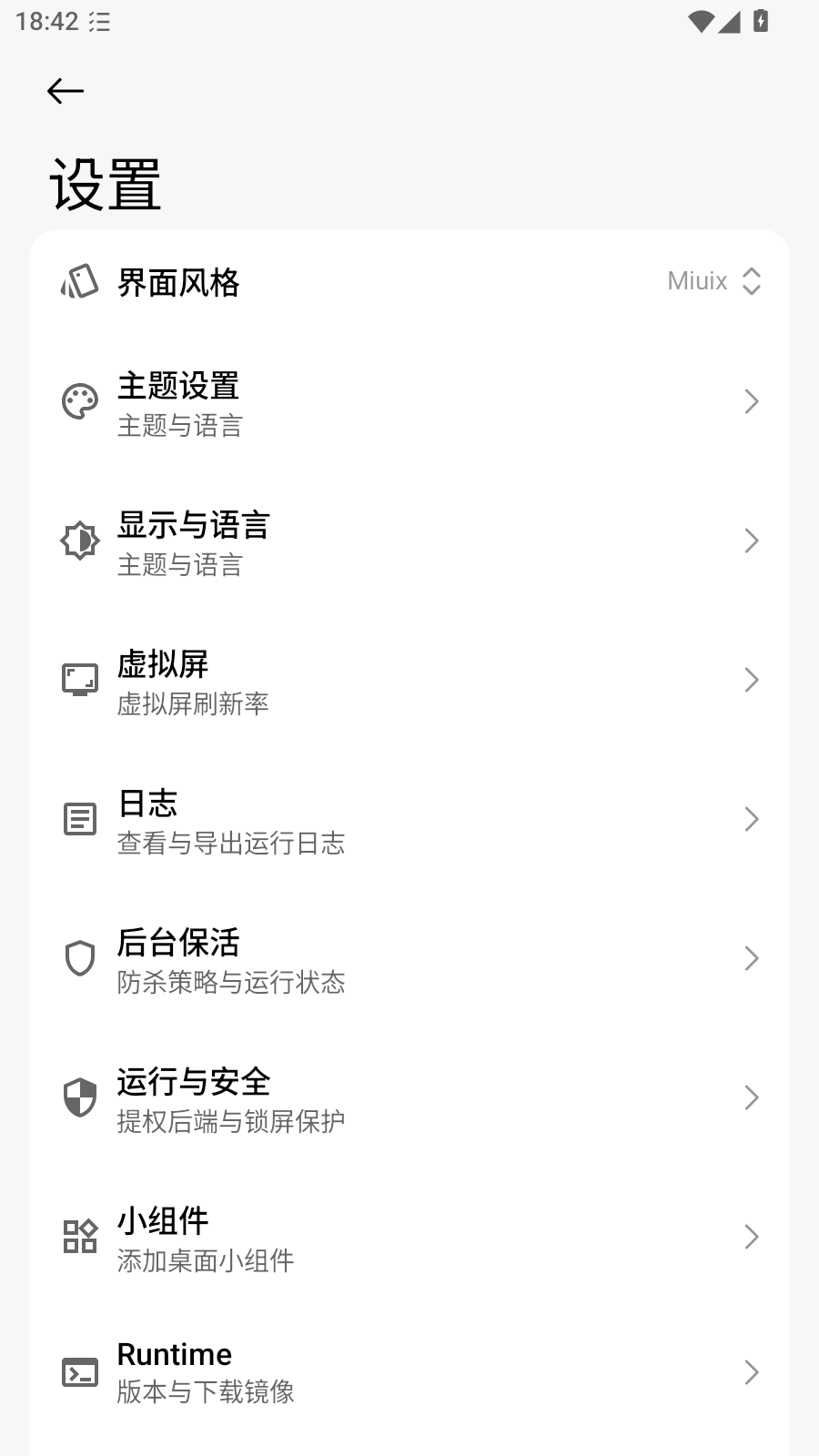
| View | Purpose |
|---|---|
| Home | Runtime health, provisioning progress, start/stop toggle, remote pairing button |
| Automation | Virtual display stream, active instance switcher, task start/stop controls |
| Console | Embedded WebUI (identical frontend to desktop edition) |
| Logs | Three-way logs covering Host, Runtime, and Privileged services |
| Settings | Appearance, download mirrors, privileges, keep-alive, screensaver, about info |
The remote pairing shortcut in the top right of the Home view connects directly to remote instances without requiring local Runtime deployment.
Global Floating Overlay
Powered by FloatingX, the global overlay operates above all applications and launcher screens:
| Action | Function |
|---|---|
| Tap Icon | Expands / collapses control panel |
| Start / Stop | Toggles task execution on active instance |
| Queue | Views scheduled tasks and active operation |
| Switch Instance | Changes target instance worker |
| Log Feed | Streams recent execution output in real time |
The overlay runs in an isolated Window independent of Activity Configuration or ViewModelStore. It receives theme and state updates via AppThemeState and OverlayController.
Overlay Missing
Confirm the "Display over other apps" permission is granted. Certain vendor skins require an additional "Background popup windows" permission.
Screensaver (Burn-In Prevention)
Long automated sessions on OLED screens risk permanent display burn-in. The screensaver mitigates this:
| Attribute | Behavior |
|---|---|
| Background | Pure black with minimized display brightness |
| Activation | Manual toggle, or automatic activation when tasks start |
| Pixel Drift | Shifts elements 16dp vertically every 10 seconds after 30 seconds of inactivity |
| Dismissal | Drag the unlock slider fully to the right |
Pixel drift operates independently of the virtual display, ensuring background game execution is undisturbed.
Home Screen Widgets
Glance and RemoteViews widgets display execution status and provide quick toggle controls from the launcher.
To prevent rendering errors across customized vendor ROMs that misinterpret ?attr vector tints, widgets utilize explicit drawable assets rather than dynamic theme attributes.
Process Keep-Alive
Aggressive system power managers are the primary cause of background task termination. The host implements three defense tiers:
- Foreground Service: Keeps process priorities elevated while Runtime or virtual displays are active, backed by a persistent notification.
- Multi-Path Keep-Alive:
KeepAliveManagerdynamically adjusts execution pathways according to settings toggles. - Battery Optimization Exemption: Requires manual user approval.
Recommended system configuration:
- Settings → Apps → AzurPilot → Battery → Unrestricted.
- Whitelist the app under device Autostart and Background Execution settings.
- Disable aggressive battery saver modes during automation.
Keep-Alive Limits
Under extreme RAM starvation or aggressive manufacturer battery management, the OS may terminate background processes regardless of keep-alive hooks. Export logs to determine whether termination was caused by a crash or an OS signal.
Log Management
Three distinct log outputs are archived separately:
| Log Type | Storage Location | Content |
|---|---|---|
| Host Log | Private App Storage | Compose UI, gateway, provisioning, update logs |
| Runtime Log | proot/session.log + upstream log/ | Task scheduler and game logic output |
| Privileged Log | Isolated timeline | ADB startup, Binder handshake, virtual display |
Features:
- Automatically saves display frame snapshots upon task errors.
- Enforces a 7-day retention rotation policy.
- Single-tap export to zip archives.
Verify Credentials Before Sharing Archives
Ensure logs do not contain config/deploy.yaml, password.txt, or remote-access.json. These credential files reside under the Runtime's config/ directory and are excluded from standard log exports.
Settings Reference
| Category | Options |
|---|---|
| Appearance | Material / Miuix style, dark/light themes, dynamic wallpaper coloring |
| Downloads | CNB / direct GitHub / mirror selection / custom endpoint prefixes |
| Operation & Security | Built-in Shizuku, Root, external services, activation status |
| Keep-Alive | Foreground service, battery optimization prompts |
| Screensaver | Auto-engage, brightness levels, drift frequency |
| OCR | Hardware acceleration backend, thread concurrency, CPU fallback |
| About | Version strings, commit hashes, open-source licenses |
Common Troubleshooting
| Issue | Root Cause |
|---|---|
| Overlay taps do nothing | Overlay permission revoked or restricted by battery saver |
| Screensaver does not drift | System animation scales set to 0 in Developer Options |
| Widget displays stale status | System launcher cached widget; remove and re-add widget |
| Tasks stop when screen turns off | Battery optimization not set to Unrestricted |
| Exported log archive is empty | Logs were pruned by 7-day rotation, or storage permissions are missing |