
WebUI Tour
The WebUI is a desktop management console constructed with React and Vite that communicates with the Python backend over /api/v1/ws. It issues scheduler commands and commits configuration patches without calling game APIs directly.
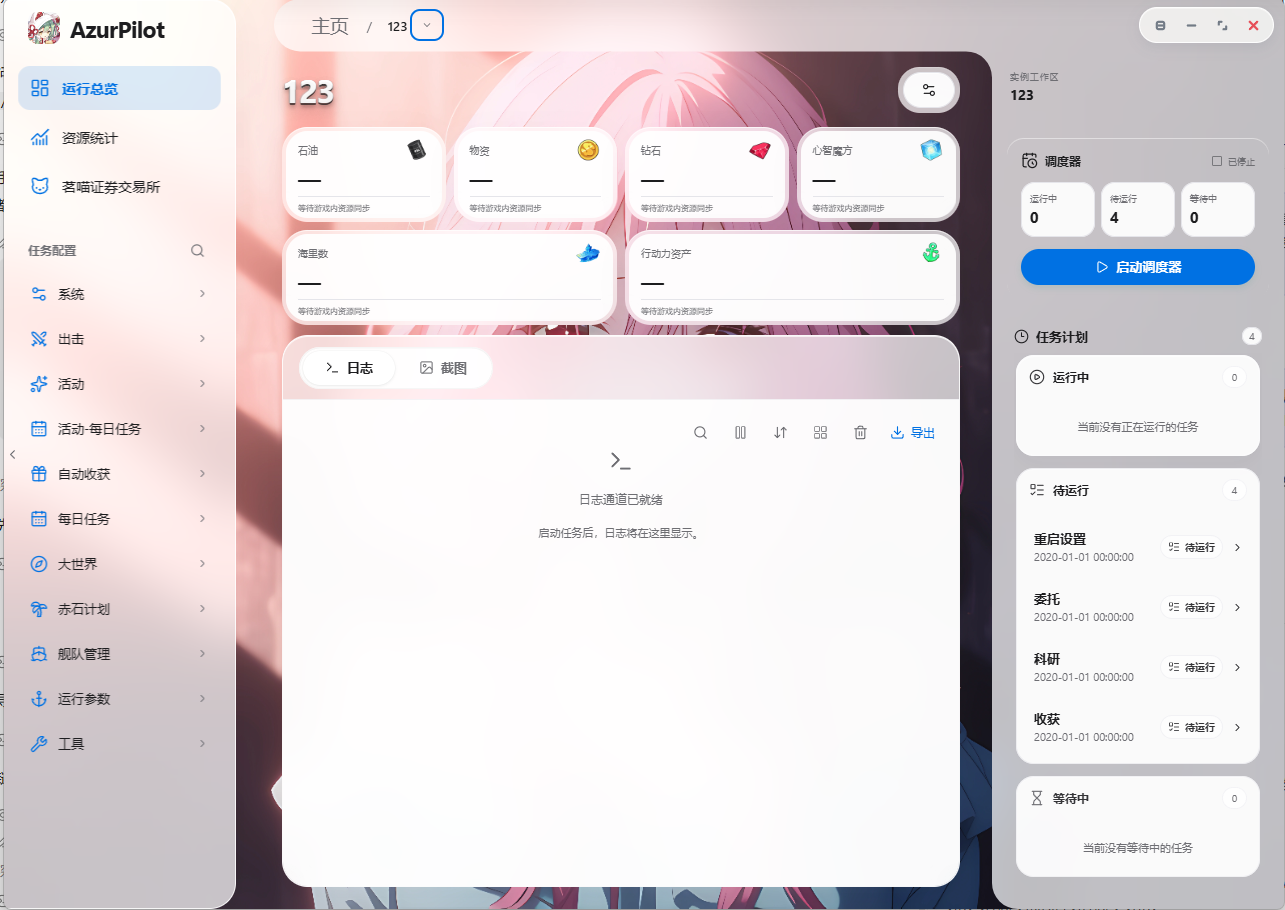
Page Catalog
| View | Route | Purpose |
|---|---|---|
| Home | / | Instance cards, start/stop switches, global announcements |
| Overview | /i/<instance>/overview | Active task, resource levels, live log tail, quick actions |
| Task Configuration | /i/<instance>/task/<task> | Forms dynamically generated from configuration schemas |
| Statistics | /i/<instance>/statistics | Sorties, resources, Operation Siren, commissions, and warehouse analytics |
| Stock Exchange | /i/<instance>/stock-exchange | Independent trade transaction ledger |
| Scheduler Program | /i/<instance>/task/SchedulerProgram | Visual graph-based orchestration (Legacy / Enhanced / Takeover) |
| Mind Calculator | /i/<instance>/task/MindCalculator | Shipyard scanning and Cognitive Array cost calculations |
| Fleet Technology | /i/<instance>/task/FleetTechnology | Tech point scanning and ship progression |
| Installed Configs | /configs | Import, export, duplicate, and remove instances |
| Settings | /settings | Account vault, remote access, updates, theme settings |
| Updates | /updater | Inspect upstream commits and apply updates |
| Announcements | /announcement | Release notes and setup advisories |
Overview View
The Overview view consolidates operational telemetry onto a single screen:
- Active Task: Displays current task name and state streamed via
set_task(). - Resources: Real-time gauges for oil, coins, gems, and action points extracted from screenshots.
- Log Tail: Worker output stream colored by log severity levels.
- Quick Actions: Start / stop / restart instances, force immediate task execution, capture test screenshot.
Log outputs clearly demarcate task transitions:
[AzurPilot] Scheduler: Start task
──────────────── Research ────────────────
[AzurPilot] Scheduler: End task
Task Configuration Forms
The left pane lists task groups (Campaign, Events, Operation Siren), while the right pane renders active forms generated dynamically from argument.yaml definitions.
Form Sections
| Section | Description |
|---|---|
| Description | Help tooltips next to task names derived from localization files |
| Scheduling Settings | Enable toggle, push notifications, next run timestamp, success/failure intervals, sensitive mode |
| Task Parameters | Specific settings for the active feature, such as stage names, fleet assignments, stop rules |
| Storage Target | Specifies which database table stores execution results |
Input Types
| Control | Schema Type | Operational Behavior |
|---|---|---|
| Checkbox | checkbox | Boolean toggle; takes effect immediately upon save |
| Select Menu | select / option | String or numeric enumeration values |
| Input Box | input / textarea | Text values with regex validation |
| Timestamp | datetime / time | Clearing the field triggers immediate task execution |
Asynchronous Save Pipeline
Form adjustments are queued and committed via config.patch with revision checks to detect concurrent edits. Wait for the "Saved" notification before navigating away.
Sensitive Tasks
Toggling Scheduler.Sensitive instructs the engine to terminate the instance worker upon errors rather than restarting the game. This setting defaults to enabled on OpsiCrossMonth, OpsiObscure, and OpsiAbyssal to prevent state corruption from repeated reboot attempts.
Visual Scheduler Program
Located under "Task Config → System → Custom Scheduling", this node-based canvas provides custom orchestration:
- Nodes feature input ports on the left and output ports on the right; square ports govern control flow, while round ports pass data.
- Supports marquee selection, multi-select, copy/paste, undo/redo, select-all, and wire deletion.
- Edit common variables (resources, tasks, comparison operators, wait delays) directly on cards, or open the right-side inspector for full properties.
- Validated server-side before application; running instances apply changes at safe task boundaries.
Three operational modes:
| Mode | Execution Behavior |
|---|---|
| Legacy Scheduling | Retains standard priorities and schedules while enabling automatic oil threshold management |
| Enhanced Scheduling | The engine selects only from enabled and due tasks, overriding parameters dynamically |
| Full Takeover | The graph governs all business tasks regardless of form toggles; recovery routes remain active |
Simulate Plans Before Application
The editor includes a simulation engine (scheduler.program.simulate) that runs test plans against simulated clocks and mock resources without connecting devices. Draft edits do not affect live workers until you click "Apply Plan".
Statistics & Analytics
The Statistics view graphs historical SQLite records: resource consumption curves, sortie counts, loot drops, Operation Siren yields, commissions, research projects, and warehouse inventories. The Resource Management tab provides Sankey diagrams tracking resource inflows and outflows.
Mind Calculator & Fleet Technology
- Mind Calculator: Scans shipyards to identify ships and levels, allowing manual review before calculating Cognitive Array requirements with JSON / CSV / XLSX export.
- Fleet Technology: Scans ship progression to track tech points independently of cognitive limit-break rules.
Both features consume data generated by MindCalculatorScan and FleetTechScan tasks.
System Settings
| Section | Scope |
|---|---|
| Account | Account vault: create, unlock, bind to TPM or local machine keys, switch profiles |
| Remote Access | Cloudflare Quick Tunnel toggle, pairing QR codes, authorized devices, revocation |
| Updates | Review local HEAD against upstream commits, pull changes, apply updates |
| Interface | Themes, languages, background image libraries, UI density |
| Configuration | Export, import, clone, and delete instances |
Themes and Localization
- Interface translations support
zh-CN,zh-TW,ja-JP, anden-US. Parameter descriptions load frommodule/config/i18n/*.json. - Dark and light themes adapt to system settings or manual overrides.
- Mobile viewports automatically collapse navigation sidebars into single-column layouts.
Keyboard Shortcuts
- Press
Ctrl/Cmd + Kto focus the global configuration search bar. - Inside the scheduling canvas:
Ctrl/Cmd + Z(Undo),Shift + Z(Redo),Ctrl/Cmd + A(Select All),Esc(Deselect),Space + Drag(Pan Canvas).